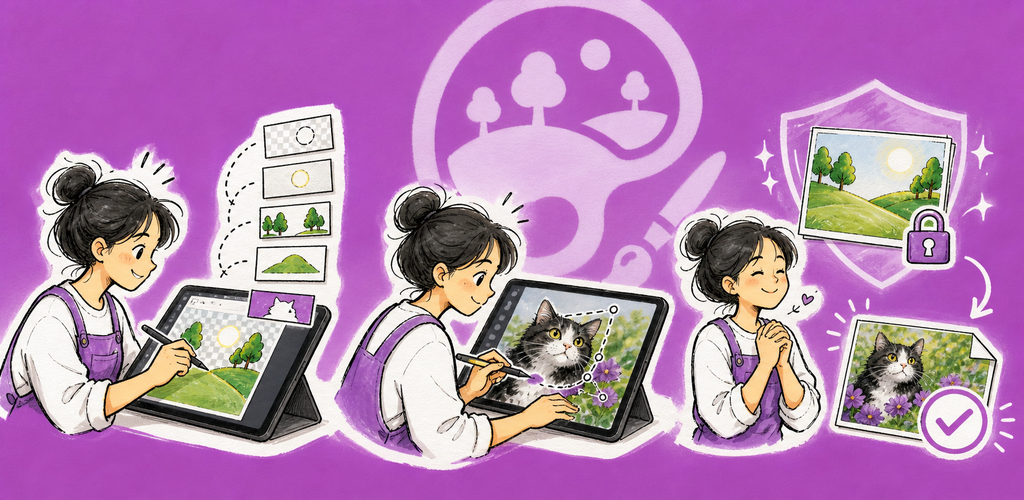
QuickImage — محرر الصور متعدد الطبقات يجمع QuickImage بين التحرير المألوف المعتمد على الطبقات وسلامة الملفات الواضحة وتقارير التوافق والاسترداد غير الإتلافي.
لماذا QuickImage؟
يجمع QuickImage بين التحرير المألوف المعتمد على الطبقات وسلامة الملفات الواضحة وتقارير التوافق والاسترداد غير الإتلافي.
أبرز المزايا
- تحرير بالطبقات: سير عمل الصور النقطية والنصوص والأشكال والتعبئة والمجموعات والأقنعة والقص والشفافية والمزج.
- الرسم والتنقيح: أدوات الفرشاة والممحاة والتعبئة والاستنساخ والتحديدات والاقتصاص والنص والأشكال والتحويل.
- PSD وPSB: يحدد تقرير التوافق المحتوى القابل للتحرير والمحوّل إلى صورة نقطية والممرر كما هو قبل المتابعة.
- استيراد OpenRaster: تُفتح أرشيفات ORA المتحقق منها كمسودات قابلة للتحرير متعددة الطبقات مع ملاحظات التحويل.
- حفظ آمن للمستندات: تبقى الصور الموجودة مرتبطة بمصدرها لسير عمل الحفظ الذري وحفظ الصورة باسم.
- تصدير للتسليم: أنشئ ملفات PNG أو JPEG أو WebP أو TIFF أو PDF أو PSD أو PSB منفصلة من دون تغيير الأصل.
الطبقات والتوافق وسلامة الملفات
يحتفظ QuickImage بالعمل غير المكتمل في مسودة استرداد، ويفحص التغييرات الخارجية قبل استبدال صورة مرتبطة، ولا يصف بيانات الاسترداد مطلقًا بأنها حفظ مكتمل للملف.
مثالي لـ
- أعمال فنية متعددة الطبقات، وتصحيحات للصور، وتعليقات توضيحية، وأصول تصميم
- مراجعة ملفات PSD أو PSB أو OpenRaster وتكييفها
- للمبدعين الذين يريدون عملاً قابلاً للتحرير وعمليات تصدير تسليم منفصلة
- عمل صور محلي أولًا حيث يهم تسلسل الملفات
البدء
- أنشئ صورة جديدة، أو افتح صورة موجودة، أو الصق من الحافظة.
- اختر أداة ثم اضبط خياراتها في الشريط أسفل القائمة.
- نظّم المحتوى في الطبقات واستخدم الأقنعة أو القص لإجراء تعديلات غير إتلافية.
- استخدم حفظ للمستند الحالي أو حفظ الصورة باسم لإنشاء نسخة عمل جديدة.
- استخدم تصدير عندما تحتاج إلى ملف تسليم منفصل بتنسيق آخر.
الخصوصية & الأمان
- تجري عمليات التحرير وتنفيذ AI المدعوم على الجهاز.
- لا تُرفع بيانات الصورة لمعالجة AI؛ يستخدم الشبكة فقط تنزيل نموذج طُلب صراحةً.
- لا يتم الوصول إلى الملفات الخارجية إلا عبر المواقع التي منحها المستخدم أو أذونات الملفات المحددة.
- تبقى عمليات التصدير ومستندات العمل ملفات منفصلة قابلة للتتبع.
التجريبي والمجاني وPro
تكون الفترة التجريبية القياسية لمدة سبعة أيام خالية من الإعلانات. بعد التجربة، يحتفظ الإصدار المجاني بمجموعة الميزات الكاملة وقد يعرض إعلانات على الأجهزة المحمولة أو تذكير دعم يومي على سطح المكتب. يزيل QuickImage Pro تلك الإعلانات والتذكيرات عبر اشتراك سنوي أو شراء مدى الحياة لمرة واحدة.
شروط الاستخدام: https://kakitiro.com/quickapps/quickimage/terms/