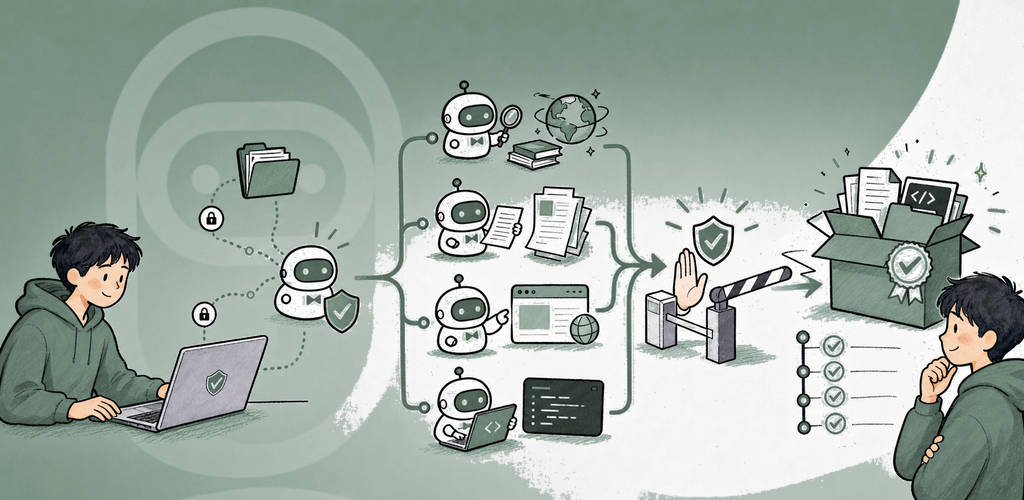
QuickAgent omdanner et mål formuleret i naturligt sprog til en gennemgåelig, holdbar kørsel. Vælg en AI-provider på enheden, lokal, LAN-baseret eller i cloud; begræns dens værktøjer med en Workspace Profile; inspicér hver følsom handling; og opbevar bekræftede output i Artefakter.
Hvorfor QuickAgent?
AI-assistance er mest nyttig, når destination, tilladelser, fremdrift og resultat forbliver synlige. QuickAgent fastholder disse grænser i produktet: providere skiftes aldrig i stilhed, værktøjstilgængelighed er baseret på live-kapabilitet, eksterne dataafsendelser får en forhåndsvisning, og usikre effekter vises aldrig som succes.
Vigtigste funktioner
- Providervalg: System AI, Ollama, LM Studio, DeskLLM, OpenAI-kompatible lokale/LAN/cloud-endpoints, Anthropic og Gemini med dine egne legitimationsoplysninger.
- Workspace Profiles: genanvendelige begrænsninger for providere, værktøjer, forbindelser, filrødder, Knowledge og Memory.
- Holdbare kørsler: planlæg, sæt på pause, genoptag, stop, prøv igen samt kontrolpunkter for godkendelse og gendannelse, der overlever genstart af appen.
- Multi-Agent-orkestrering: planlægger, specialistarbejdere, gennemgår, sikkerhedsgennemgang, afgrænsede budgetter og ét gennemgået endeligt svar.
- Værktøjer og forbindelser: filer, Office/PDF/data, medier, browser- og computerbrug, udviklingskommandoer, SSH, MCP, HTTP, SaaS, smart-home-broer og notifikationer, hvor det understøttes.
- Automatiseringer: tidsplaner, overvågninger, webhooks, apphændelser og Shortcut/App Intent-udløsere, der opretter almindelige sikkerhedsstyrede kørsler.
- Skills og Packs: typede input, forhåndsvisning af tilladelser, import/eksport og syv indbyggede Packs til Office, Coding, Smart Home, Research, Browser Automation, Personal Admin og Incident Response.
- Knowledge og Memory: afgrænsede kilder og bevidste, separat godkendte hukommelsesskrivninger i stedet for automatisk indsamling af chathistorik.
- Artefakter og historik: inspicér, åbn, del, eksportér, omvend sikkert egnede handlinger og revidér enhver sikkerhedsbeslutning og værktøjshandling.
- Stemme og vedhæftninger: diktér, optag stemmenoter, og tilføj filer, mapper, billeder, videobilleder, lyd, QuickNote-indhold eller Knowledge, når platformen understøtter det.
Sikkerhed, du kan forstå
Hver handling er mærket Sikker, Godkend, Bekræft eller Kritisk. Godkendelsesskærme viser mål, destination, oversigt over nyttelast og Fortryd-status. Kritiske handlinger kræver stærk bekræftelse. Data, der forlader enheden, får vist deres nøjagtige destination og en forhåndsvisning af nyttelasten.
Perfekt til
- Research og oprettelse af brief med kilder
- Arbejdsgange for Office-dokumenter, PDF'er og strukturerede data
- Gennemgåede opgaver med filer, browser, udvikling og fjernværter
- Gentagen overvågning og personlig administration
- Teams, der har brug for synlige tilladelser, godkendelser og varig dokumentation
Kom godt i gang
- Opret forbindelse til og test en AI-udbyder.
- Opret eller gennemgå en Workspace Profile.
- Start en New Chat, og beskriv det resultat, du ønsker.
- Tilføj kun den Context, Knowledge eller Memory, som kørslen behøver.
- Gennemgå planen og eventuelle forhåndsvisninger af godkendelse eller Data Send.
- Følg Timeline, og åbn verificerede resultater i Artifacts.
Privatliv og sikkerhed
QuickAgent gemmer apptilstand lokalt og bruger platformbeskyttet lagring af legitimationsoplysninger. Filrødder, Knowledge, Memory og forbindelser afgrænses via Workspace Profiles. Netværksanmodninger sker kun til de udbydere og tjenester, du konfigurerer. Enhedstilladelser anmodes i den relevante sammenhæng og kan ændres i systemindstillingerne.
Free, Trial og Pro
Alle QuickAgent-funktioner er tilgængelige under prøveperioden og i Free. Efter prøveperioden på syv dage kan Free vise mobilannoncer eller en daglig skrivebordspåmindelse. QuickAgent Pro fjerner disse annoncer og påmindelser; det opretter ikke et særskilt funktionsniveau. Vælg et årsabonnement eller et engangskøb med livstidsadgang.
Brugsvilkår: https://kakitiro.com/quickapps/quickagent/terms/