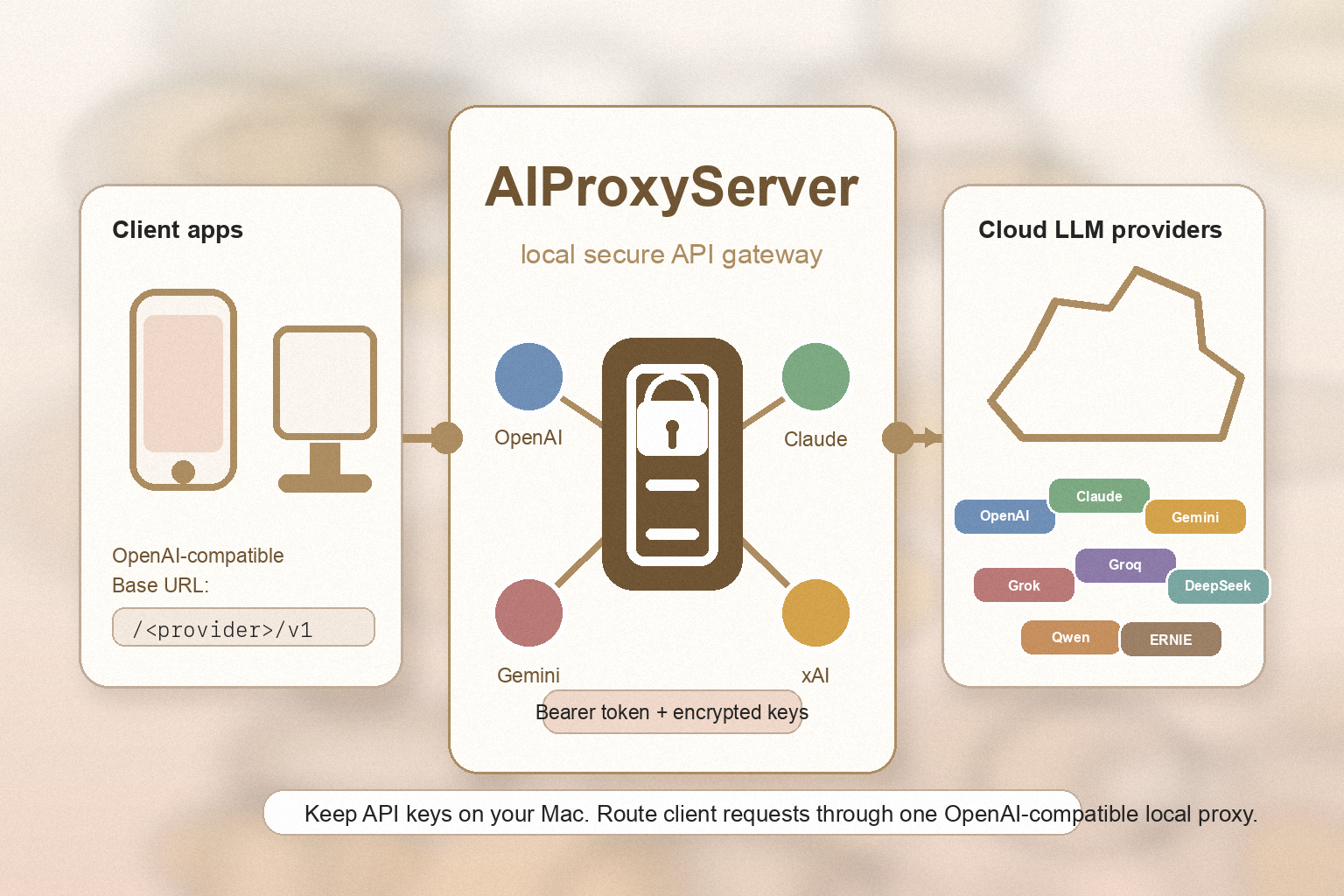
AIProxyServer is a local proxy that exposes a single OpenAI-compatible API for eleven major cloud AI providers. Your other apps connect to http://localhost, while AIProxyServer holds the API keys, rotates the upstream requests, and translates each provider's protocol into the OpenAI format you already know.
Why AIProxyServer?
- One vault, every provider — Store your ChatGPT, Claude, Gemini, Grok and other API keys once. Every connected app reuses them without ever seeing the secrets.
- App Store friendly — Mobile and tablet apps distributed through stores cannot ship API key registration screens. Point those apps at AIProxyServer running on your Mac and the limitation disappears.
- Drop-in OpenAI compatibility — Any client that speaks the OpenAI Chat Completions API works out of the box. No custom adapter required for Claude, Gemini, ERNIE, or any other supported cloud.
- Encrypted on disk — API keys are stored in an encrypted vault using a per-machine master key with restricted file permissions.
Key Features
- Eleven cloud providers — OpenAI (ChatGPT), Anthropic (Claude), Google (Gemini), xAI (Grok), Azure OpenAI (Copilot), Perplexity, Groq, DeepSeek, Moonshot (Kimi), Alibaba (Qwen), and Baidu (ERNIE)
- OpenAI-compatible endpoints —
/<provider>/v1/chat/completionsand/<provider>/v1/modelson every provider - Real-time streaming — Server-Sent Events (SSE) forwarded for every provider, including Anthropic and Gemini whose native formats are translated on the fly
- Optional Bearer Token authentication — Off by default for hassle-free local use, easily switched on when you expose the proxy to your LAN
- Localhost-only by default — Network exposure is opt-in; the proxy only binds to
127.0.0.1until you enable LAN access - Encrypted credential vault — API keys and secret keys stored with Fernet encryption and a 0600 master key file
- Auto-start on launch — Bring up the app and the proxy is immediately ready to receive requests
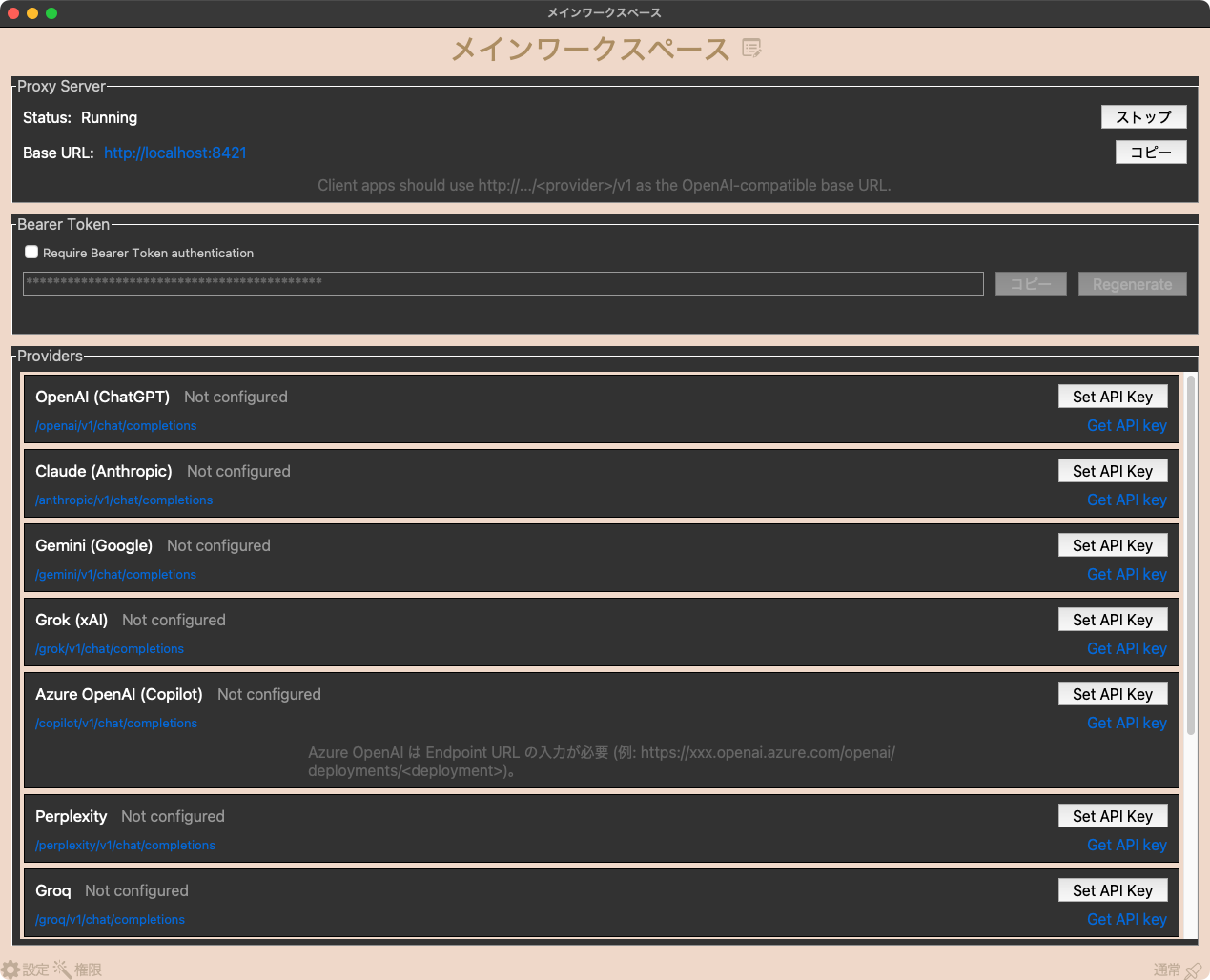
- Per-provider notes and links — Quick access to each provider's API key page right from the main window
Perfect For
- Developers building cross-platform apps that cannot embed API key registration UIs due to store policies
- Flutter, Swift, Electron, and web app developers who want a single OpenAI-compatible backend for every cloud AI
- Power users who subscribe to multiple AI services and want to switch providers without changing client code
- Small teams sharing a single Mac as an AI gateway across phones, tablets, and laptops on the same Wi-Fi network
- Anyone who would rather keep API keys in one vault on their own machine than scattered across every app's settings
Getting Started
- Launch AIProxyServer — the proxy starts automatically on port
8421 - Pick a provider from the list and click Set API Key, then paste the key obtained from the provider's console
- For ERNIE add both API Key and Secret Key. For Azure OpenAI paste your deployment endpoint URL
- Point your client app at
http://localhost:8421/<provider>/v1using the OpenAI SDK or any compatible HTTP client - If you want to access the proxy from another device on the same Wi-Fi, enable Allow LAN Access and turn on Require Bearer Token to protect it
Privacy
- API keys never leave your computer. Stored encrypted with a master key in
~/Library/Application Support/AIProxyServer/with 0600 permissions - The proxy only forwards requests to providers you explicitly configured — nothing is sent anywhere else
- No telemetry, analytics, or background calls of any kind
- No account, no sign-up, no cloud component. You run the proxy, you own the keys
- Localhost-only listening by default; LAN exposure must be turned on by you