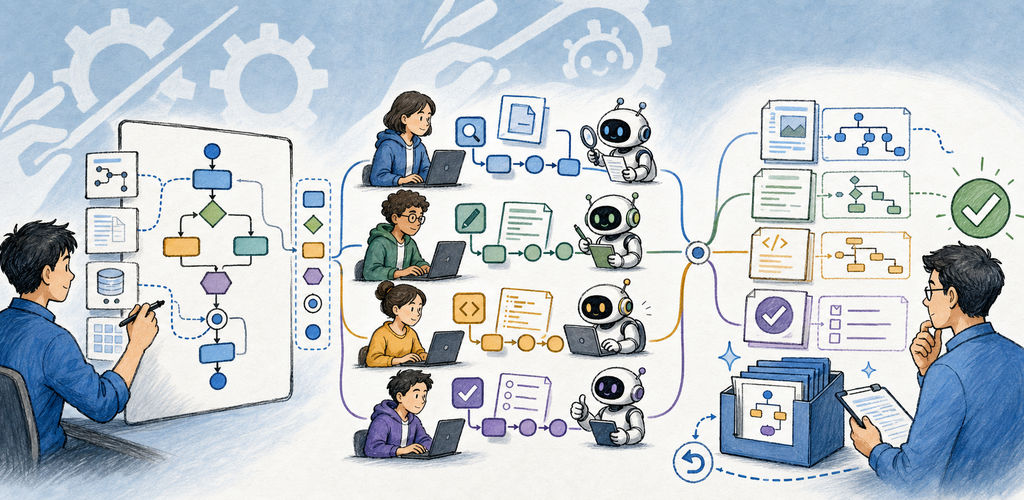
QuickEngineering — AI Workflow Orchestrator QuickEngineering turns a goal into a connected flow of explicit tasks, instructions, workers, inputs, results, reviews, and publishable artifacts.
Why QuickEngineering?
QuickEngineering turns a goal into a connected flow of explicit tasks, instructions, workers, inputs, results, reviews, and publishable artifacts.
Key Features
- Flow Editor: Connect tasks, inputs, results, mappings, contracts, conditions, budgets, and gates.
- Prompt Workspace: Manage reusable prompts, variables, variants, matrices, evaluation, and versioned prompt assets.
- Agent routing: Use System AI, local models, MCP agents, configured cloud providers, or human steps.
- Durable Runs: Track queued, active, paused, waiting, failed, reviewed, and completed work with retry boundaries.
- Agent Queue and MCP: Let scoped external agents claim work, receive context, and return progress and results.
- Artifacts and review: Keep typed outputs, lineage, versions, comments, diffs, rollback, export, publish, and audit history.
Task → Instructions → Agent → Result
The Flow Editor keeps each task's purpose, prompt, worker, input contract, output contract, and review boundary visible rather than burying orchestration in one chat.
Perfect For
- Multi-step research, writing, coding, review, and publishing workflows
- Comparing several AI or human perspectives before synthesis
- Repeatable prompt systems with variables and output contracts
- Teams that need approvals, artifacts, lineage, and audit evidence
Getting Started
- Create a Project and choose a workspace only when the flow needs files or code.
- Create a Flow, then add tasks with explicit Instructions and Result names.
- Choose an Agent for each task and map prior results into later inputs.
- Add review, human, data-send, budget, or publish gates where impact requires them.
- Run the flow, follow Runs and Agent Queue, then inspect Artifacts and History.
Privacy & Security
- Secrets remain references rather than expanded project text.
- Data Send Preview shows the destination and selected payload before external transmission.
- Agent and MCP access is scoped, capability-tested, and routed through review boundaries.
- Audit History records decisions and results without intentionally exposing raw credentials.
Trial, Free, and Pro
The standard seven-day trial is ad-free. After the trial, Free keeps the full feature set and may show mobile advertising or a daily desktop support reminder. QuickEngineering Pro removes those ads and reminders through a yearly subscription or a one-time lifetime purchase.
Terms of Use: https://kakitiro.com/quickapps/quickengineering/terms/